
In Shopify's own 2025 survey, 75% of business owners said they used AI tools to run their online stores, and 67% said they used ChatGPT, making it the most widely adopted individual AI tool among respondents. The commercial implication is more important than the novelty: shoppers and merchants are already comfortable using conversational interfaces, so Shopify AI chat should be treated as part of the storefront, not as a decorative support bubble. (Shopify's survey and AI chatbot guidance)
The strongest implementations do three jobs well. They answer product and policy questions with store-specific facts, they recognize high-intent behavior, and they create data that helps the merchant improve products, pages, and merchandising. The weak ones only repeat an FAQ and call that automation.
The Sale You Lost While You Were Sleeping
A Shopify merchant starts the morning with a refund request, three abandoned carts, and a one-star review that says nobody responded overnight. One shopper wanted to know whether the medium was in stock. Another needed confirmation that an order would arrive before a birthday. A third reached checkout, hesitated over shipping, and left before the support team opened its inbox.
Those incidents look separate in the admin. They aren't. Each one reflects a missing answer at a high-intent moment, and each gives the shopper a reason to choose a competitor that responds faster. The refund may be recoverable, but the trust behind it is harder to restore. The review can influence future buyers long after the original question disappears.
Human support still matters, but human coverage has limits. A small team can't be present for every time zone, product launch, weekend visit, and late-night checkout. Shopify reports that 70% of conversations in Shopify Inbox happen while shoppers are actively making a purchasing decision, which places chat directly inside the conversion window rather than at the edge of the customer experience. (Shopify's AI chatbot guidance)
The storefront needs an after-hours layer
Shopify AI chat gives the storefront a response layer when nobody is available to type. It can handle order-status questions, return-policy requests, product comparisons, sizing concerns, and other objections that commonly interrupt a purchase. More advanced systems can recommend products, apply relevant promotions, and guide a shopper toward checkout, as Shopify describes in its customer-service guidance for AI chat.
That doesn't mean every conversation should be automated. A useful system answers routine questions immediately, recognizes when the shopper is ready to buy, and hands sensitive or complex cases to a person. It also records what shoppers asked, so the merchant can fix the underlying source of confusion.
Practical rule: Treat unanswered questions as lost-revenue signals, not merely support backlog.
The overnight merchant doesn't need a bot that talks constantly. They need a reliable associate that answers the right question before hesitation becomes abandonment. That distinction shapes every decision that follows, from data quality to trigger design and measurement.
What Shopify AI Chat Actually Is
Shopify AI chat is a storefront chat interface connected to the information that governs a store. In a serious implementation, that information includes the product catalog, variants, inventory, prices, shipping rules, return policies, frequently asked questions, and relevant order data.
The system has three practical layers:
- The interface, usually a widget or conversational panel that visitors can open on product, collection, cart, or checkout-related pages.
- The store data feed, which supplies current product and policy information instead of relying on generic internet knowledge.
- The language model, which interprets a shopper's question and produces a natural answer grounded in the store's approved information.
A shopper might ask, “Will this jacket fit someone who normally wears a medium, and can it arrive by Friday?” The chat needs more than a keyword match. It must find the relevant size guidance, understand the product's availability, apply the store's shipping information, and communicate uncertainty when the answer depends on destination or cutoff time.
That's why Shopify AI chat isn't just a generic ChatGPT window embedded in a theme. A generic model may produce fluent text without knowing whether a particular variant is available or whether a policy applies to the shopper's order. It also isn't a rigid rule tree that sends every question down a predetermined branch. Rules remain useful for escalation and compliance, but natural language lets shoppers ask questions in their own words.
Think like a sales associate with live store access
The most helpful analogy is a well-trained sales associate who never forgets a SKU and never sleeps. The associate knows the catalog, can explain policies, can ask a follow-up question, and understands when to stop selling and involve a human.
For a practical explanation of how conversational systems support ecommerce journeys, see this guide to conversational AI for ecommerce. The important implementation question isn't whether the model sounds human. It's whether the answer is accurate, timely, useful, and connected to an action such as viewing a variant, adding an item, starting checkout, or contacting support.
Core Capabilities That Move Revenue
Most chatbot feature lists are too broad. For Shopify merchants, four capabilities deserve attention because each connects a specific shopper problem to a measurable store outcome.
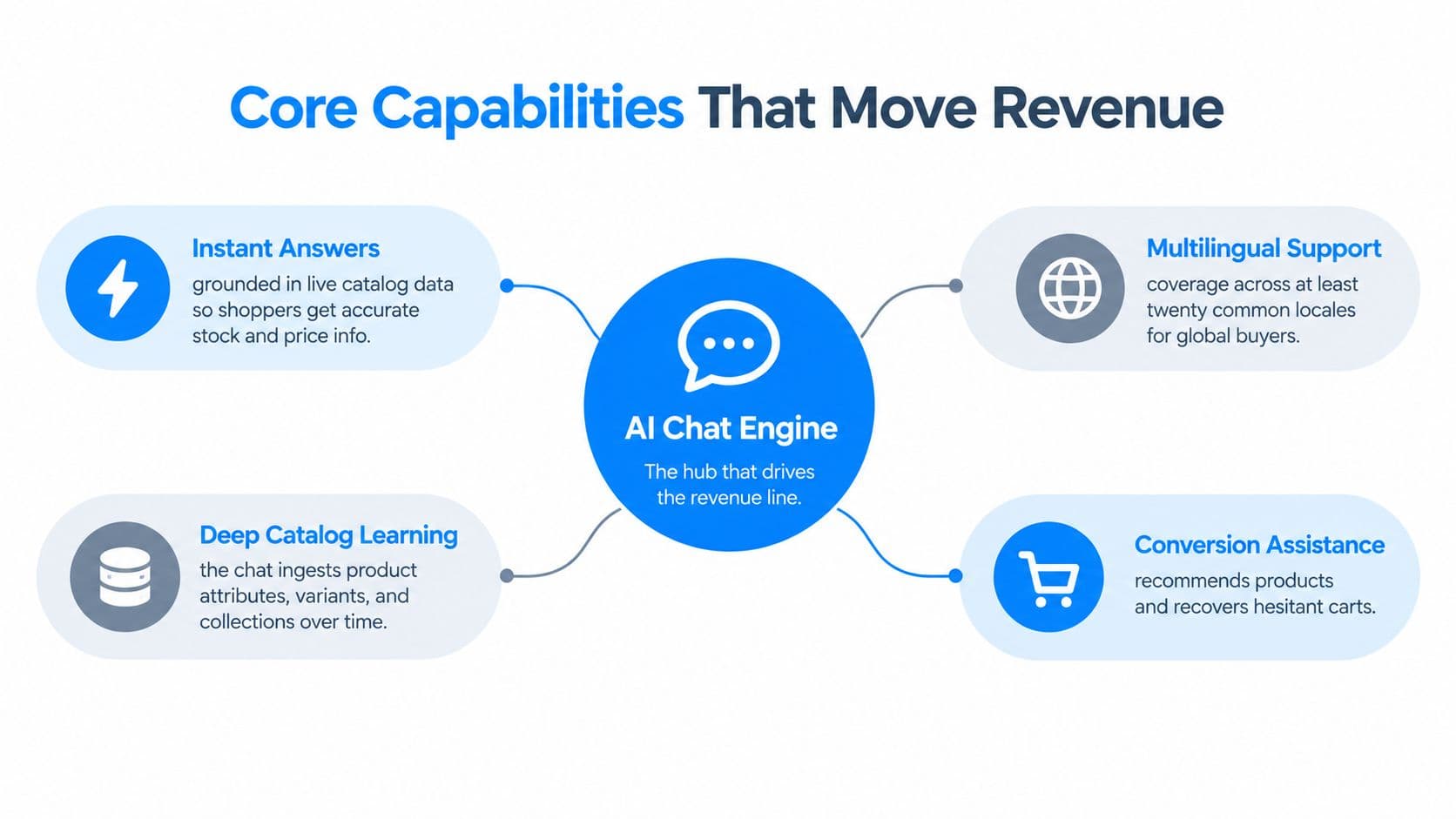
Instant answers grounded in catalog data
A shopper asks whether a specific size is in stock. A useful chat checks the relevant variant and answers from current catalog information. It shouldn't send the shopper to a general collection page or invent availability from an outdated product description.
This capability reduces friction because the shopper can move from uncertainty to a product action without opening another support channel. It also protects trust. Incorrect answers about price, stock, shipping, or returns can create more work than no answer at all.
Multilingual support that matches buying context
A French-speaking customer may ask about delivery timing, exchange rules, or whether a product's sizing follows local expectations. Multilingual chat lets the store respond in the shopper's language instead of forcing the customer to translate a policy page or abandon the visit.
Language support matters most when it preserves commercial meaning. A translated product answer should retain variant names, measurements, shipping conditions, and policy limits. A fluent but inaccurate translation is still a conversion problem.
Catalog learning beyond product titles
A returning shopper may ask about a product they viewed last week, a compatible accessory, or the difference between two variants. The chat needs access to attributes, collections, options, and related products, not just a list of titles.
Deep catalog learning also creates a merchandising opportunity. If shoppers repeatedly ask whether two products work together, the store may need a compatibility guide, comparison block, bundle, or clearer product metadata. The transcript becomes a source of product-page improvements rather than a closed support ticket.
Proactive triggers at moments of hesitation
A shopper pauses on a product page, returns to the same item, reaches a pricing page, or shows exit intent. A carefully configured prompt can ask whether they need help with fit, delivery, comparison, or another specific objection.
The prompt must match the signal. A welcome message shown to every visitor is rarely as useful as a targeted question shown after meaningful engagement. Shopify's guidance also distinguishes simple support from deeper sales assistance, including recommendations, promotions, and in-chat checkout support. (Shopify's customer-service guidance)
A good system connects each capability to a store outcome:
- Catalog answers reduce avoidable support tickets.
- Multilingual guidance removes friction for international buyers.
- Catalog learning improves recommendations and exposes merchandising gaps.
- Behavior-based triggers recover attention before a hesitant shopper leaves.
The revenue work happens in the connection between the capability and the shopper's decision, not in the feature label.
Reactive Support Chat Versus Proactive Sales Chat
Reactive chat waits for the shopper to start the conversation. Proactive sales chat watches for a meaningful signal and opens a relevant conversation before the shopper leaves. Both belong in a mature Shopify store, but they solve different problems.
| Dimension | Reactive Support Chat | Proactive Sales Chat |
|---|---|---|
| Response model | Answers a shopper-initiated question | Starts a conversation based on behavior |
| Trigger logic | Widget open, support request, order query | Product engagement, repeat visit, exit intent, stalled checkout |
| Typical use cases | Order status, returns, shipping, account help | Product comparison, recommendations, cart recovery, upsell |
| Primary KPI | Resolution rate, response time, ticket deflection | Chat-assisted add-to-cart, checkout start, purchase |
| Revenue impact | Protects trust and removes service friction | Creates buying momentum and recovers hesitation |
Reactive support is the safety net. A shopper opens the widget because they need a return instruction or want to know where an order is. The correct response is concise, accurate, and easy to act on. Shopify explicitly identifies straightforward questions such as order tracking and return policies as strong chatbot use cases. (Shopify's AI chatbot customer-service guidance)
Proactive chat needs intent thresholds
Proactive chat is closer to an onsite sales associate. It can ask a shopper comparing two products whether they want a side-by-side recommendation, or it can offer help when a customer stalls during checkout. The objective isn't to display more prompts. It's to create a useful intervention at the moment an objection is forming.
Poor timing makes a store feel intrusive. A prompt that appears before a shopper has read the product page interrupts research. A prompt that appears after repeated engagement and focuses on a likely question can feel helpful.
Independent ecommerce research cited by Shopify reports that shoppers who engaged with AI chat converted at 12.3%, compared with 3.1% for shoppers who didn't, a roughly fourfold difference. The same guidance connects proactive triggers such as exit intent, inactivity, and checkout hesitation with recovery performance. (Shopify's AI customer-service guidance)
Use reactive chat to protect confidence. Use proactive chat to create a reason to continue. Measure them separately, because combining them hides whether the store is resolving problems or generating incremental purchase intent.
How Different Shopify Stores Put Chat to Work
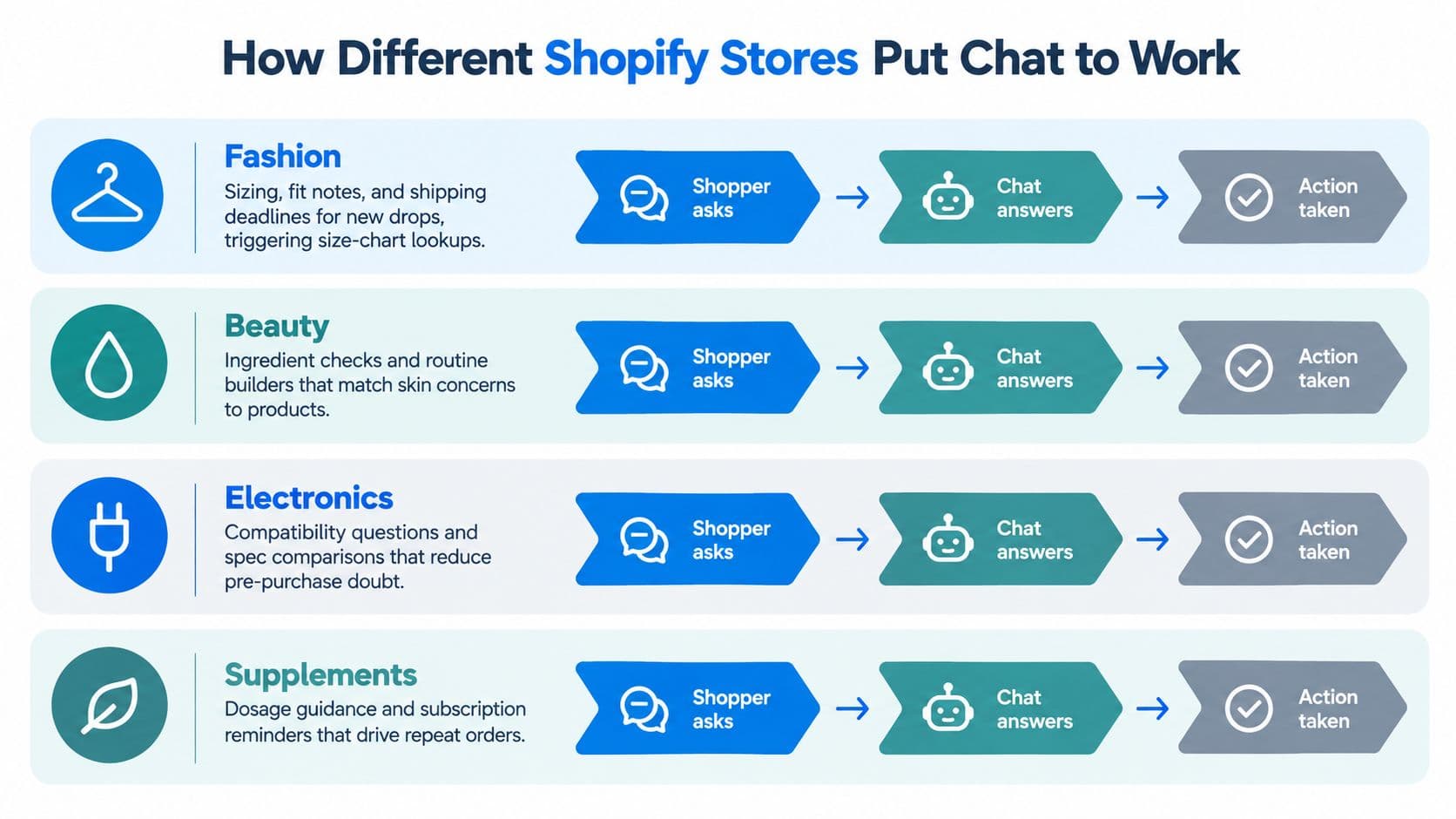
A fashion store and a supplement store shouldn't deploy the same conversation flow. The shopper's decision depends on the product category, the risk of a wrong choice, and the information needed before purchase.
Fashion
A shopper on a new-drop product page may need help with fit, fabric behavior, or delivery timing. Chat should surface the size chart, explain fit notes, and answer whether the desired variant is available. A dwell-time trigger makes sense when the visitor has spent enough time evaluating the product, especially if the prompt asks about sizing rather than offering a generic greeting.
Beauty and skincare
Beauty shoppers often need help matching a product to an ingredient preference, skin concern, or existing routine. A useful system can compare formulas, explain approved product information, and suggest a regimen without making unsupported medical claims.
Catalog learning matters here because the relationship between products carries much of the buying decision. If a cleanser, serum, and moisturizer are commonly considered together, the store should make those connections clear in chat and on the site.
Home goods and electronics
Home shoppers ask whether an item fits a space, works with an existing component, or can arrive before an installation date. Electronics shoppers ask compatibility and specification questions. In both categories, chat should guide comparison rather than force the customer to open multiple product pages.
For examples of conversation patterns across ecommerce categories, this collection of ecommerce chatbot examples offers useful reference points. The implementation lesson is simple: organize product data around the decisions shoppers make, not around the fields that happen to exist in the product admin.
Wellness and supplements
Wellness merchants need tighter boundaries. Chat can explain product attributes, suggest alternatives based on stated preferences, and flag when a consultation or professional advice is appropriate. It shouldn't diagnose conditions or turn symptoms into unsupported product claims.
The shared pattern across all four categories is decision-aware chat. Generic FAQ bots answer the same way regardless of what the shopper is trying to decide. Vertical-aware systems recognize whether the buyer needs confidence about fit, ingredients, compatibility, delivery, or safe use.
Measuring the ROI of AI Chat
Shopify reports that AI traffic to stores rose 7x since January 2025, AI-driven orders rose 11x, and 64% of shoppers said they were likely to use AI in purchases. Those figures justify testing AI chat, not claiming that a widget caused revenue. Shopify also advises merchants to review generated facts and customize FAQs, so measurement must include governance as well as conversion tracking. (TechCrunch's coverage of Shopify AI commerce data)
Instrument events before judging performance
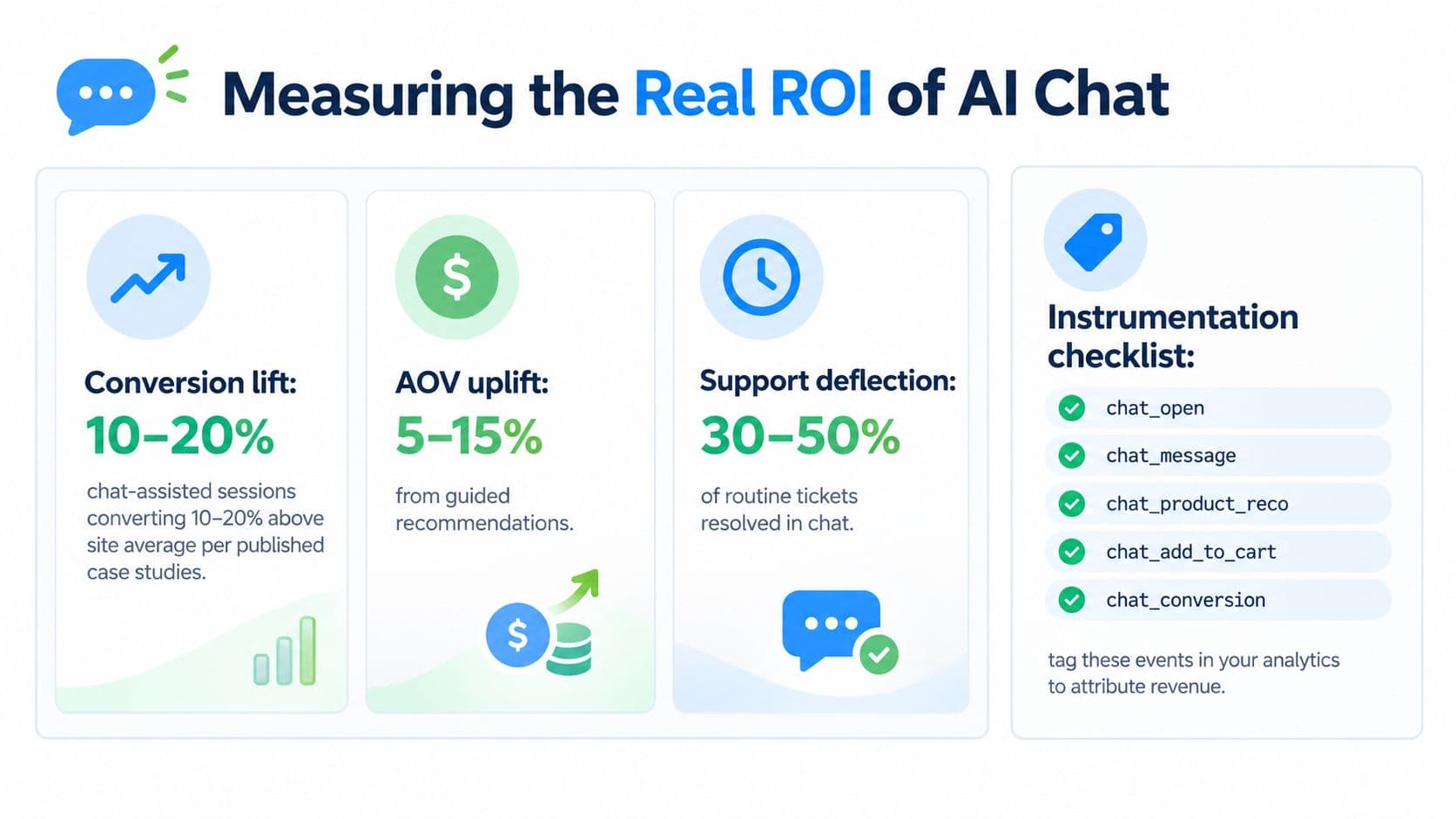
Track the full path from conversation to order. At minimum, record:
- Chat opened: the shopper opened the interface.
- Message sent: the shopper engaged with the assistant.
- Product recommendation clicked: chat influenced product discovery.
- Add to cart after chat: the session produced a cart action.
- Checkout started after chat: the shopper entered checkout after assistance.
- Purchase after chat: the conversation preceded a completed order.
Add properties for product ID, page type, trigger type, conversation outcome, and human handoff. A single “chat engaged” metric cannot support a merchandising decision. For a deeper look at connecting chat events to revenue, see this guide to revenue attribution.
Segment triggers instead of averaging them
Separate welcome prompts, product-page dwell triggers, exit intent, cart-value prompts, and checkout hesitation. Each trigger attracts a different shopper and reflects a different level of intent. One may generate useful product questions, while another interrupts returning customers. Averaging them hides the difference.
Compare chat-assisted sessions with a baseline or control window. Track conversion, add-to-cart rate, checkout starts, purchase rate, and average order value. For support use cases, count routine tickets resolved without a human and estimate the cost of tickets avoided.
Treat published conversion benchmarks as a hypothesis to test against your own control window, not as a guaranteed lift.
Measurement rule: If you cannot identify the trigger, event sequence, and resulting order, you do not know which chat behavior created value.
Use question logs as merchandising input. Group unanswered questions and repeated objections by product, collection, and trigger type. If shoppers repeatedly ask about sizing, compatibility, delivery, or ingredients, improve the relevant product data, comparison content, filters, or merchandising rules instead of merely adding another FAQ response.
Record a pre-launch baseline before changing the widget, prompts, or checkout experience. Otherwise, seasonality, promotions, traffic mix, and product launches can make a weak implementation look successful or a strong one look ineffective.
How to Evaluate a Shopify AI Chat Vendor
Run every vendor through the same checklist. A polished demo can hide shallow catalog access, weak analytics, and expensive usage rules.
| Criterion | What It Reveals | Red Flag |
|---|---|---|
| Catalog depth | Whether the system reads variants, attributes, metafields, collections, inventory, and price | It only uses product titles and descriptions |
| Shopify-native integration | Whether the app works with Shopify data and storefront surfaces without fragile custom work | Theme hacks break during updates |
| Multilingual coverage | Whether the assistant handles local language, sizing, currency, and shipping context | Translation changes product meaning |
| Trigger types | Whether the tool can target high-intent behavior with clear rules | Only a passive widget or generic greeting |
| Analytics | Whether you can export conversations, unanswered questions, and conversion events | No event-level attribution |
| Pricing model | Whether costs remain predictable as traffic and conversations grow | Per-conversation billing rises unexpectedly |
Test the catalog, not the sales pitch
Ask the vendor to answer questions about a specific variant, inventory state, product attribute, shipping destination, and return condition. Then change the underlying store data and test again. A system that cannot reflect the store's current facts isn't ready to represent the brand.
Integration quality also matters. Check how the app receives product data, how quickly updates appear, what happens when a product is unpublished, and whether the widget works across the templates that matter to the business. A system that requires repeated manual uploads will drift.
Demand usable evidence
Open the analytics dashboard and look for chat-open events, product recommendations, add-to-cart actions, purchases, escalation records, and unanswered-question logs. Ask whether those records can be exported to the store's warehouse or analytics platform.
Carti is one Shopify-focused option that connects storefront chat with catalog and policy information, supports product recommendations and proactive engagement, and includes an insights dashboard for common questions. Evaluate it with the same tests as every other vendor. Pricing deserves equal scrutiny: predictable subscription pricing is easier to plan around than usage charges that expand with traffic.
Bringing AI Chat Into Your Store
Treat the rollout as a controlled pilot, not a dramatic sitewide launch. The first job isn't teaching the bot to sound clever. It's making sure the store has accurate product copy, current shipping and returns policies, and a clear record of the questions customers already ask.
A practical four-week rollout
Week one, data preparation. Clean product titles, descriptions, variant information, and policy pages. Pull the most common questions from support conversations and write approved answers that reflect current operations.
Week two, configuration. Connect the catalog, define escalation rules, and start with a small set of triggers. Keep the initial scope low risk, such as order status, sizing, shipping, returns, and product discovery.
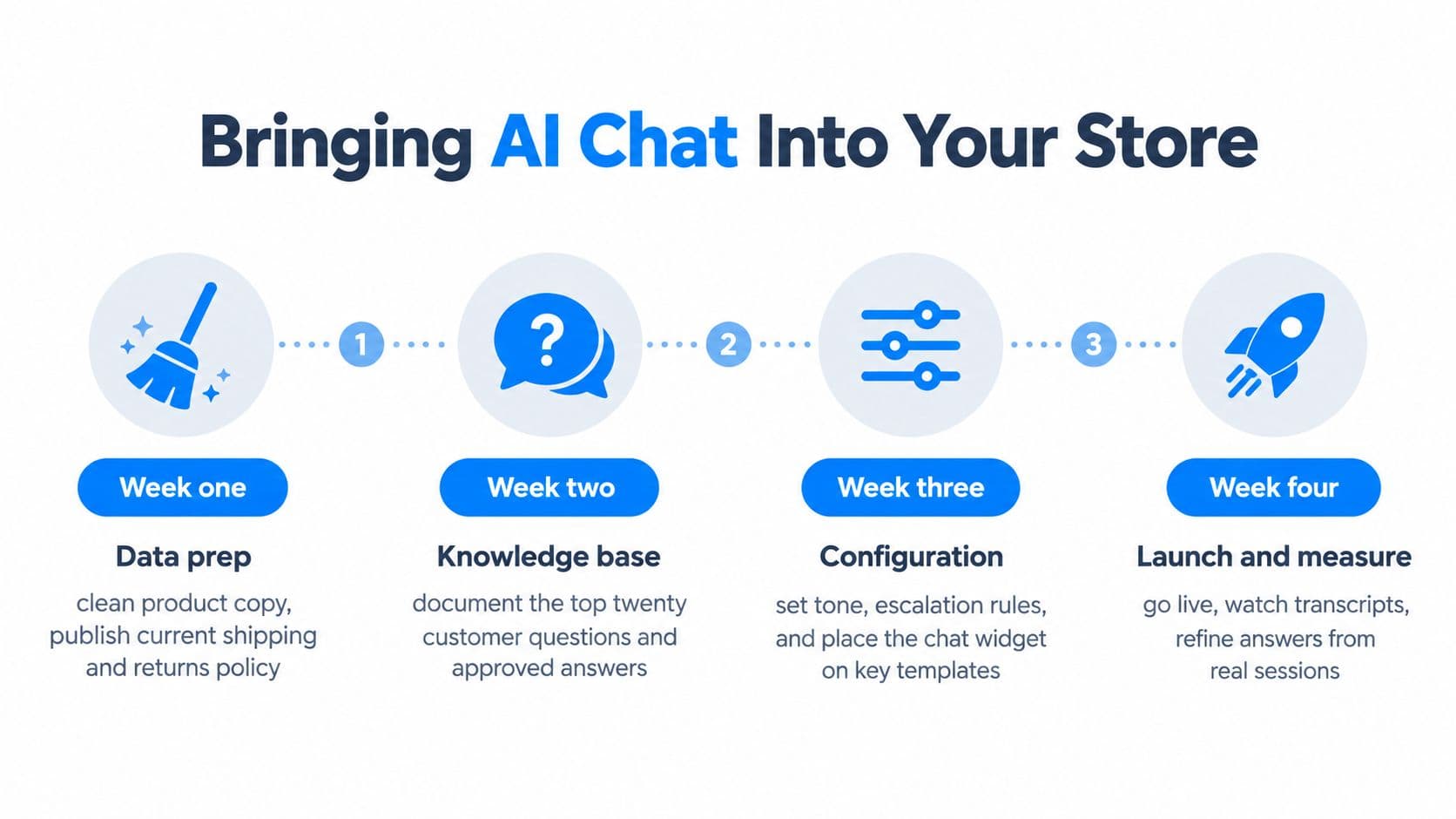
Week three, measurement. Add chat events to analytics and label each session by trigger type. Review transcripts for unanswered questions, incorrect answers, and repeated objections. If shoppers keep asking about compatibility, sizing, or delivery, update the relevant product pages instead of expecting chat to carry the entire burden.
Week four, expansion. Add carefully selected recommendation and cart-recovery flows. Extend language coverage where the store has meaningful demand, and route high-intent or sensitive conversations to a human.
The common mistake is set-and-forget automation. A bot trained on stale product copy will become less trustworthy as the catalog, inventory, policies, and promotions change. Question logs are a customer-research channel, so use them to improve collection pages, comparison content, bundles, FAQs, and product attributes.
For broader local digital marketing context and practical guidance from an Arizona digital agency blog, review how agencies connect customer experience work with broader site and content decisions. The same principle applies here: chat performs best when it reinforces a clear, accurate storefront.
Start with one high-intent product category, a small trigger set, and event-level measurement. Expand only after the transcripts show that the assistant answers accurately and the data shows which conversations influence the next store action.
Carti gives Shopify stores a catalog-aware chat assistant that answers product and policy questions, recommends relevant items, and engages shoppers before they leave. If you want to test Shopify AI chat with measurable events and actionable question logs, visit Carti and start with a focused pilot.

Written by
Daniel AndersonFounder of Carti. 10+ years building ecommerce brands in apparel and supplements. Still runs a Shopify store and built Carti to help merchants convert more browsers into buyers.
Ready to boost your store's sales?
Install Carti in 5 minutes and let AI handle customer questions, recommend products, and close sales 24/7.
Start Free Trial14-day free trial